ElasticSearch Engine
This article mainly introduces the installation, usage and configuration of the ElasticSearch engine plugin in Linkis.
1. Preliminary work
1.1 Engine installation
If you want to use the ElasticSearch engine on your Linkis service, you need to install the ElasticSearch service and make sure the service is available.
1.2 Service Authentication
Use the following command to verify whether the ElasticSearch engine service is available. If the service has enabled user authentication, you need to add --user username:password
curl [--user username:password] http://ip:port/_cluster/healty?pretty
The following output means that the ElasticSearch service is available, note that the cluster status is green
{
  "cluster_name" : "docker-cluster",
  "status" : "green",
  "timed_out" : false,
  "number_of_nodes" : 1,
  "number_of_data_nodes" : 1,
  "active_primary_shards" : 7,
  "active_shards" : 7,
  "relocating_shards" : 0,
  "initializing_shards" : 0,
  "unassigned_shards" : 0,
  "delayed_unassigned_shards" : 0,
  "number_of_pending_tasks" : 0,
  "number_of_in_flight_fetch" : 0,
  "task_max_waiting_in_queue_millis" : 0,
  "active_shards_percent_as_number" : 100.0
}
2. Engine plugin installation
2.1 Engine plugin preparation (choose one) non-default engine
Method 1: Download the engine plug-in package directly
Method 2: Compile the engine plug-in separately (maven environment is required)
# compile
cd ${linkis_code_dir}/linkis-engineconn-plugins/elasticsearch/
mvn clean install
# The compiled engine plug-in package is located in the following directory
${linkis_code_dir}/linkis-engineconn-plugins/elasticsearch/target/out/
EngineConnPlugin Engine Plugin Installation
2.2 Upload and load engine plugins
Upload the engine plug-in package in 2.1 to the engine directory of the server
${LINKIS_HOME}/lib/linkis-engineconn-plugins
The directory structure after uploading is as follows
linkis-engineconn-plugins/
├── elasticsearch
│   ├── dist
│ │ └── 7.6.2
│   │       ├── conf
│ │ └── lib
│   └── plugin
│ └── 7.6.2
2.3 Engine refresh
2.3.1 Restart and refresh
Refresh the engine by restarting the linkis-cg-linkismanager service
cd ${LINKIS_HOME}/sbin
sh linkis-daemon.sh restart cg-linkismanager
2.3.2 Check if the engine is refreshed successfully
You can check whether the last_update_time of this table in the linkis_engine_conn_plugin_bml_resources in the database is the time when the refresh is triggered.
#Login to the linkis database
select * from linkis_cg_engine_conn_plugin_bml_resources;
3. Engine usage
3.1 Submit tasks through Linkis-cli
-codeType parameter description
essql: ExecuteElasticSearchengine tasks throughSQLscriptsesjson: ExecuteElasticSearchengine tasks throughJSONscript
essql method example
Note: Using this form, the ElasticSearch service must install the SQL plug-in, please refer to the installation method: https://github.com/NLPchina/elasticsearch-sql#elasticsearch-762
 sh ./bin/linkis-cli -submitUser Hadoop \
 -engineType elasticsearch-7.6.2 -codeType essql \
 -code '{"sql": "select * from kibana_sample_data_ecommerce limit 10' \
 -runtimeMap linkis.es.http.method=GET \
 -runtimeMap linkis.es.http.endpoint=/_sql \
 -runtimeMap linkis.es.datasource=hadoop  \
 -runtimeMap linkis.es.cluster=127.0.0.1:9200
esjson style example
sh ./bin/linkis-cli -submitUser Hadoop \
-engineType elasticsearch-7.6.2 -codeType esjson \
-code '{"query": {"match": {"order_id": "584677"}}}' \
-runtimeMap linkis.es.http.method=GET \
-runtimeMap linkis.es.http.endpoint=/kibana_sample_data_ecommerce/_search \
-runtimeMap linkis.es.datasource=hadoop  \
-runtimeMap linkis.es.cluster=127.0.0.1:9200
More Linkis-Cli command parameter reference: Linkis-Cli usage
4. Engine configuration instructions
4.1 Default Configuration Description
| Configuration | Default | Required | Description |
|---|---|---|---|
| linkis.es.cluster | 127.0.0.1:9200 | yes | ElasticSearch cluster, multiple nodes separated by commas |
| linkis.es.datasource | hadoop | 是 | ElasticSearch datasource |
| linkis.es.username | none | no | ElasticSearch cluster username |
| linkis.es.password | none | no | ElasticSearch cluster password |
| linkis.es.auth.cache | false | No | Whether the client caches authentication |
| linkis.es.sniffer.enable | false | No | Whether the client enables sniffer |
| linkis.es.http.method | GET | No | Call method |
| linkis.es.http.endpoint | /_search | No | Endpoint called by JSON script |
| linkis.es.sql.endpoint | /_sql | No | Endpoint called by SQL script |
| linkis.es.sql.format | {"query":"%s"} | No | Template called by SQL script, %s is replaced with SQL as the request body to request Es cluster |
| linkis.es.headers.* | None | No | Client Headers Configuration |
| linkis.engineconn.concurrent.limit | 100 | No | Maximum concurrent engine |
4.2 Configuration modification
If the default parameters are not satisfied, there are the following ways to configure some basic parameters
4.2.1 Management console configuration
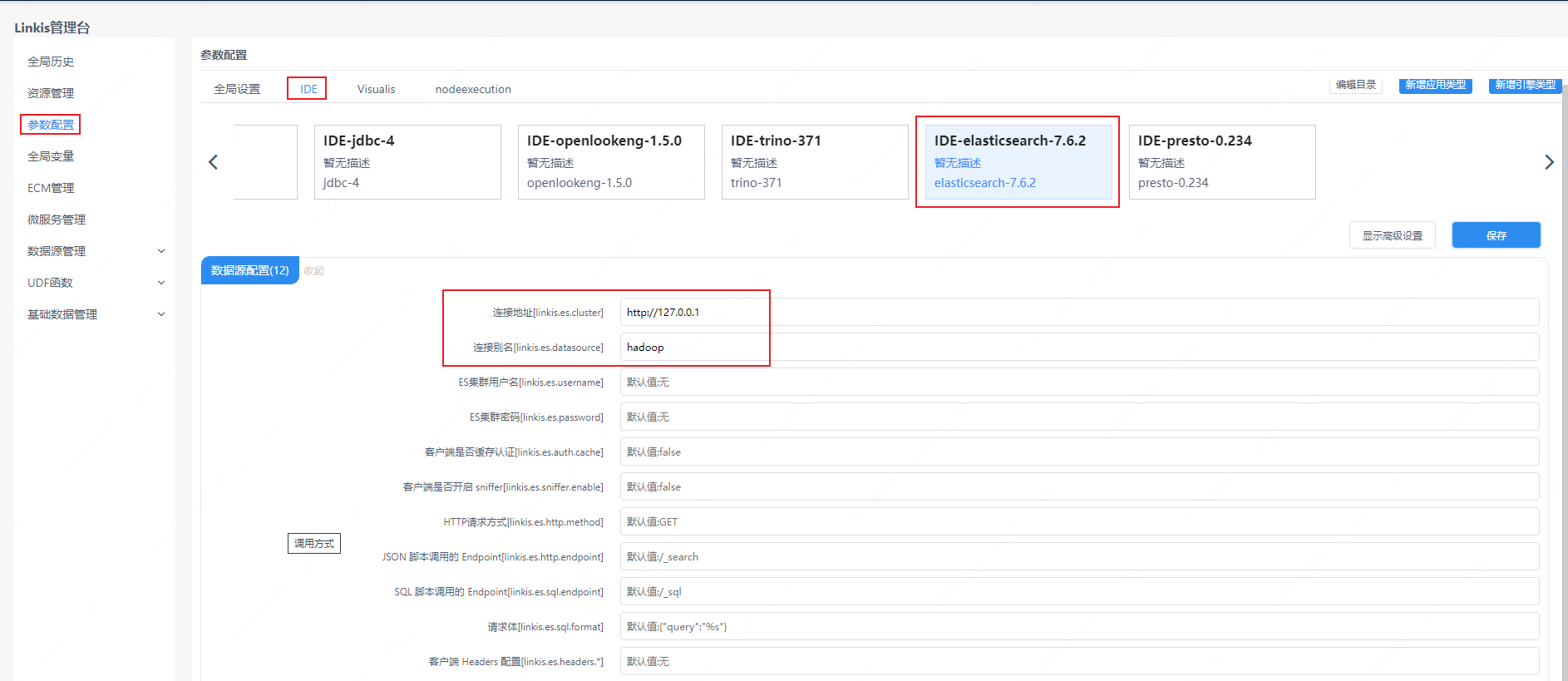
Note: After modifying the configuration under the IDE tag, you need to specify -creator IDE to take effect (other tags are similar), such as:
sh ./bin/linkis-cli -creator IDE -submitUser hadoop \
-engineType elasticsearch-7.6.2 -codeType esjson \
-code '{"query": {"match": {"order_id": "584677"}}}' \
-runtimeMap linkis.es.http.method=GET \
-runtimeMap linkis.es.http.endpoint=/kibana_sample_data_ecommerce/_search
4.2.2 Task interface configuration
Submit the task interface, configure it through the parameter params.configuration.runtime
Example of http request parameters
{
    "executionContent": {"code": "select * from kibana_sample_data_ecommerce limit 10;", "runType":  "essql"},
    "params": {
                    "variable": {},
                    "configuration": {
                            "runtime": {
                                "linkis.es.cluster":"http://127.0.0.1:9200",
                                "linkis.es.datasource":"hadoop",
                                "linkis.es.username":"",
                                "linkis.es.password":""
                                }
                            }
                    },
    "labels": {
        "engineType": "elasticsearch-7.6.2",
        "userCreator": "hadoop-IDE"
    }
}
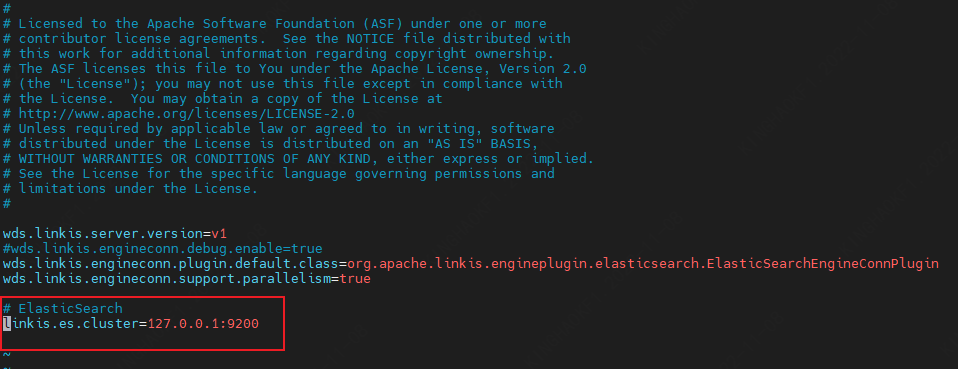
4.2.3 File Configuration
Configure by modifying the linkis-engineconn.properties file in the directory ${LINKIS_HOME}/lib/linkis-engineconn-plugins/elasticsearch/dist/7.6.2/conf/, as shown below:
4.3 Engine related data sheet
Linkis is managed through the engine tag, and the data table information involved is shown below.
linkis_ps_configuration_config_key: key and default values of configuration parameters inserted into the engine
linkis_cg_manager_label: Insert engine label such as: elasticsearch-7.6.2
linkis_ps_configuration_category: Insert the directory association of the engine
linkis_ps_configuration_config_value: The configuration that the insertion engine needs to display
linkis_ps_configuration_key_engine_relation: The relationship between the configuration item and the engine
The initial data related to the engine in the table is as follows
-- set variable
SET @ENGINE_LABEL="elasticsearch-7.6.2";
SET @ENGINE_ALL=CONCAT('*-*,',@ENGINE_LABEL);
SET @ENGINE_IDE=CONCAT('*-IDE,',@ENGINE_LABEL);
SET @ENGINE_NAME="elasticsearch";

-- engine label
insert into `linkis_cg_manager_label` (`label_key`, `label_value`, `label_feature`, `label_value_size`, `update_time`, `create_time`) VALUES ('combined_userCreator_engineType', @ENGINE_ALL, 'OPTIONAL', 2, now(), now());
insert into `linkis_cg_manager_label` (`label_key`, `label_value`, `label_feature`, `label_value_size`, `update_time`, `create_time`) VALUES ('combined_userCreator_engineType', @ENGINE_IDE, 'OPTIONAL', 2, now(), now());

select @label_id := id from `linkis_cg_manager_label` where label_value = @ENGINE_IDE;
insert into `linkis_ps_configuration_category` (`label_id`, `level`) VALUES (@label_id, 2);

-- configuration key
INSERT INTO `linkis_ps_configuration_config_key` (`key`, `description`, `name`, `default_value`, `validate_type`, `validate_range`, `engine_conn_type`, `is_hidden`, `is_advanced`, `level`, `treeName`) VALUES ('linkis.es.cluster', 'eg: http://127.0.0.1:9200', 'connection address', 'http://127.0.0.1:9200', 'None', '', @ENGINE_NAME , 0, 0, 1, 'data source conf');
INSERT INTO `linkis_ps_configuration_config_key` (`key`, `description`, `name`, `default_value`, `validate_type`, `validate_range`, `engine_conn_type`, `is_hidden`, `is_advanced`, `level`, `treeName`) VALUES ('linkis.es.datasource', 'Connection Alias', 'Connection Alias', 'hadoop', 'None', '', @ENGINE_NAME, 0, 0, 1, 'Datasource Configuration');
INSERT INTO `linkis_ps_configuration_config_key` (`key`, `description`, `name`, `default_value`, `validate_type`, `validate_range`, `engine_conn_type`, `is_hidden`, `is_advanced`, `level`, `treeName`) VALUES ('linkis.es.username', 'username', 'ES cluster username', 'No', 'None', '', @ENGINE_NAME, 0, 0, 1, 'data source conf');
INSERT INTO `linkis_ps_configuration_config_key` (`key`, `description`, `name`, `default_value`, `validate_type`, `validate_range`, `engine_conn_type`, `is_hidden`, `is_advanced`, `level`, `treeName`) VALUES ('linkis.es.password', 'password', 'ES cluster password', 'None', 'None', '', @ENGINE_NAME, 0, 0, 1, 'data source conf');
INSERT INTO `linkis_ps_configuration_config_key` (`key`, `description`, `name`, `default_value`, `validate_type`, `validate_range`, `engine_conn_type`, `is_hidden`, `is_advanced`, `level`, `treeName`) VALUES ('linkis.es.auth.cache', 'Does the client cache authentication', 'Does the client cache authentication', 'false', 'None', '', @ENGINE_NAME, 0, 0, 1, 'data source conf');
INSERT INTO `linkis_ps_configuration_config_key` (`key`, `description`, `name`, `default_value`, `validate_type`, `validate_range`, `engine_conn_type`, `is_hidden`, `is_advanced`, `level`, `treeName`) VALUES ('linkis.es.sniffer.enable', 'Whether the client enables sniffer', 'Whether the client enables sniffer', 'false', 'None', '', @ENGINE_NAME, 0, 0, 1, 'data source conf');
INSERT INTO `linkis_ps_configuration_config_key` (`key`, `description`, `name`, `default_value`, `validate_type`, `validate_range`, `engine_conn_type`, `is_hidden`, `is_advanced`, `level`, `treeName`) VALUES ('linkis.es.http.method', 'call method', 'HTTP request method', 'GET', 'None', '', @ENGINE_NAME, 0, 0, 1, 'data source conf');
INSERT INTO `linkis_ps_configuration_config_key` (`key`, `description`, `name`, `default_value`, `validate_type`, `validate_range`, `engine_conn_type`, `is_hidden`, `is_advanced`, `level`, `treeName`) VALUES ('linkis.es.http.endpoint', '/_search', 'JSON script Endpoint', '/_search', 'None', '', @ENGINE_NAME, 0, 0, 1, 'data source conf');
INSERT INTO `linkis_ps_configuration_config_key` (`key`, `description`, `name`, `default_value`, `validate_type`, `validate_range`, `engine_conn_type`, `is_hidden`, `is_advanced`, `level`, `treeName`) VALUES ('linkis.es.sql.endpoint', '/_sql', 'SQL script Endpoint', '/_sql', 'None', '', @ENGINE_NAME, 0, 0, 1, 'data source conf');
INSERT INTO `linkis_ps_configuration_config_key` (`key`, `description`, `name`, `default_value`, `validate_type`, `validate_range`, `engine_conn_type`, `is_hidden`, `is_advanced`, `level`, `treeName`) VALUES ('linkis.es.sql.format', 'The template called by the SQL script, replace %s with SQL as the request body to request the Es cluster', 'request body', '{"query":"%s"}', 'None', '', @ENGINE_NAME, 0, 0, 1, 'data source conf');
INSERT INTO `linkis_ps_configuration_config_key` (`key`, `description`, `name`, `default_value`, `validate_type`, `validate_range`, `engine_conn_type`, `is_hidden`, `is_advanced`, `level`, `treeName`) VALUES ('linkis.es.headers.*', 'Client Headers Configuration', 'Client Headers Configuration', 'None', 'None', '', @ENGINE_NAME, 0, 0, 1, 'data source conf');
INSERT INTO `linkis_ps_configuration_config_key` (`key`, `description`, `name`, `default_value`, `validate_type`, `validate_range`, `engine_conn_type`, `is_hidden`, `is_advanced`, `level`, `treeName`) VALUES ('linkis.engineconn.concurrent.limit', 'engine max concurrency', 'engine max concurrency', '100', 'None', '', @ENGINE_NAME, 0, 0, 1, 'data source conf') ;

-- key engine relation
insert into `linkis_ps_configuration_key_engine_relation` (`config_key_id`, `engine_type_label_id`)
(select config.id as config_key_id, label.id AS engine_type_label_id FROM `linkis_ps_configuration_config_key` config
INNER JOIN `linkis_cg_manager_label` label ON config.engine_conn_type = @ENGINE_NAME and label_value = @ENGINE_ALL);

-- engine default configuration
insert into `linkis_ps_configuration_config_value` (`config_key_id`, `config_value`, `config_label_id`)
(select relation.config_key_id AS config_key_id, '' AS config_value, relation.engine_type_label_id AS config_label_id FROM `linkis_ps_configuration_key_engine_relation` relation
INNER JOIN `linkis_cg_manager_label` label ON relation.engine_type_label_id = label.id AND label.label_value = @ENGINE_ALL);